

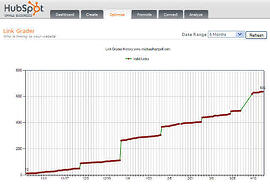
 Here are resources to help you find links to your site. No links to your website reduces the chance of being found. Experts agree that links to a site has a direct impact on SEO. Each link to your website is another door leading to your website. Those businesses with more links have more authority in the eyes of search engines. Each link is a "vote" saying: "Your website is a place to be."
The graphic to the above right is from inside HubSpot software which has a link grader tool built in.
Can't find links to your site from the other businesses? How do you find links to your site?
SiteChecker
Sitechecker's SEO checker is a valuable tool that can quickly scan any web page of your site and identify technical errors and SEO issues that may be affecting your website's performance. By generating a comprehensive report of errors found on your web page, Sitechecker allows you to pinpoint areas that require improvement and take steps to optimize your site for maximum visibility and search engine rankings.
Linkscape.com
Linkscape provides never-before-accessed link data on over 54+ billion URLs across 230+ million domains.
SEMRush
Majestic SEOMajestic-SEO is the worlds largest backlinks and anchor text database. Our proprietary robots have crawled over 137 billion webpages and found over 1,137 billion unique links and their anchor text.
This information is available in detailed reports, where links and anchor text are shown in order of importance, based on their backlinks. Each website's backlinks can all be downloaded as '.CSV' file.
Backlink Checker Software
Submit Express Link Popularity Check Tool
How popular is your website? This tool will show you how many other sites are linking to you. Most search engines use this data to calculate how popular your website is.
Backlink Watch
Type the URL of your website to get complete detailed information about quality and quantity of backlinks pointing to your website. It will show you "anchor" text, pagerank, total outbound links on that page, and nofollow flag for each of your inbound link available.
101 Ways to Build Link Popularity from SEOBook
SEOBook offers expert SEO and internet marketing advice, tools, books, and software.
LinkPopularity.com
Get a free email each month to report who links to your website from Google, MSN and Yahoo.
How can I find links to my site for business on Bing?
To see the inbound links of a page in Bing, use this command:
linkdomain:www.yourtargetsite.com
Or, use this command to see the links of a page, except the links from other pages on the same site:
linkdomain:www.yourtargetsite.com -domain:www.yourtargetsite.com
How do I find links to my site using Google?
You can perform a Google search using the link: operator to find a sampling of links to any site. For instance, [link:www.google.com] will list web pages that have links pointing to the Google home page. Note there can be no space between the "link:" and the web page URL.
Discover your links via Google.
To see a much larger sampling of links to any verified site in Webmaster Tools:
- On the Webmaster Tools Home page, click the site you want.
- Under Your site on the web, click Links to your site.
Note: Not all links to your site may be listed. This is normal.
Note about link data:
Unfortunately this is not like balancing a checkbook for business. Each tool will recognize a different number of links. Yahoo seems to be a popular tool for measuring. If you choose three different tools and check each month, you should be able to show progress.
updated 5-18-2023

